For producing farms in Québec and Ontario

Your spreadsheet records.
OlaGrow warns you.

A season planned from your farm's own frost dates, every task showing up at the right time, and a memory of all your seasons — in the field as in the office.

10 spots · On-site onboarding included

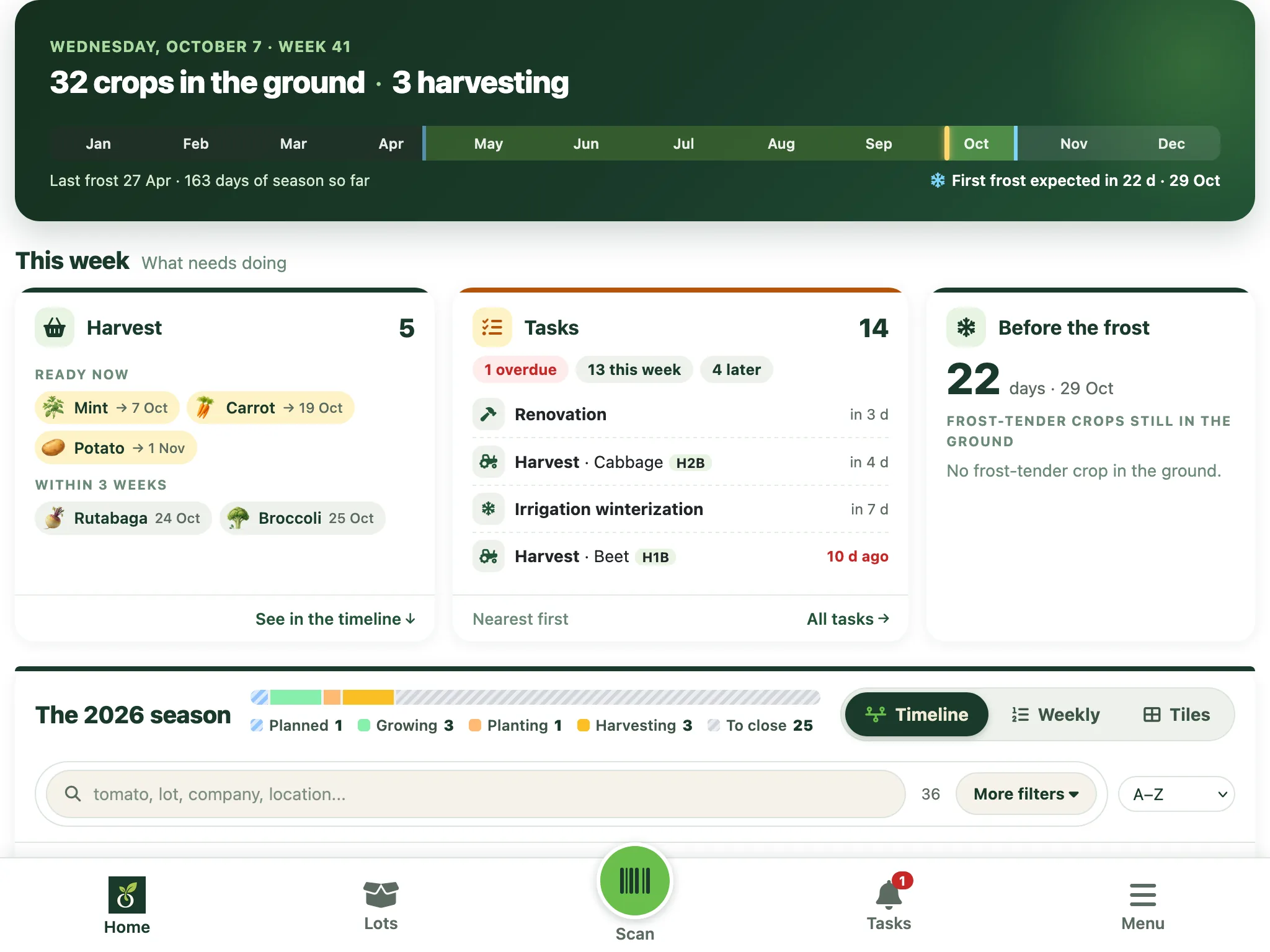
OlaGrow dashboard: the timeline of batches in the ground, each stage placed on the year.

Three things a spreadsheet won't do for you

It doesn't know your frost

It knows neither where your farm is nor when your field freezes. OlaGrow starts from your postal code and anchors the whole season on your two frost dates.

It doesn't warn you

A late row is still just a row. OlaGrow surfaces each task at the right time and warns you when a harvest risks landing after the frost.

It stays in the office

A ten-tab file is hard to open with soil on your hands. OlaGrow fits in a phone, and the whole crew sees the same season.

The whole season, anchored on your frost.

Your postal code is enough: OlaGrow derives your last spring frost and your first fall frost from it. Each column of the grid is a planting session dated from those two markers, outdoors, under cover or indoors. You enter your quantities, and the season plan exists.

  • Frost dates derived from your postal code — never shared with a third party
  • Outdoor, greenhouse and indoor planting sessions, dated from your frost
  • One row per vegetable, herb or flower, in plants or bed-metres
  • Plans and batches are created from the cell, without leaving the grid
  • Your beds drawn at their real size, each plan placed where it goes
OlaGrow season planning grid: crops as rows, dated planting sessions as columns — X-A Apr 17 to X-H Oct 31 outdoors, S-1 to S-3 in the greenhouse — with quantities entered in the cells.

The right tasks, at the right time.

Each batch moves from stage to stage — seeding, potting up, transplanting, harvest — and OlaGrow surfaces the matching tasks in the right week. Whatever is late rises to the top. You no longer have to remember anything.

  • Tasks created automatically from each batch's stage
  • Overdue and upcoming at the top, in list, week or month view
  • A warning when a harvest is projected after the likely frost
  • Yearly recurring work, placed once on the 52 weeks
  • A task assigned to a crew member, checked off from the field
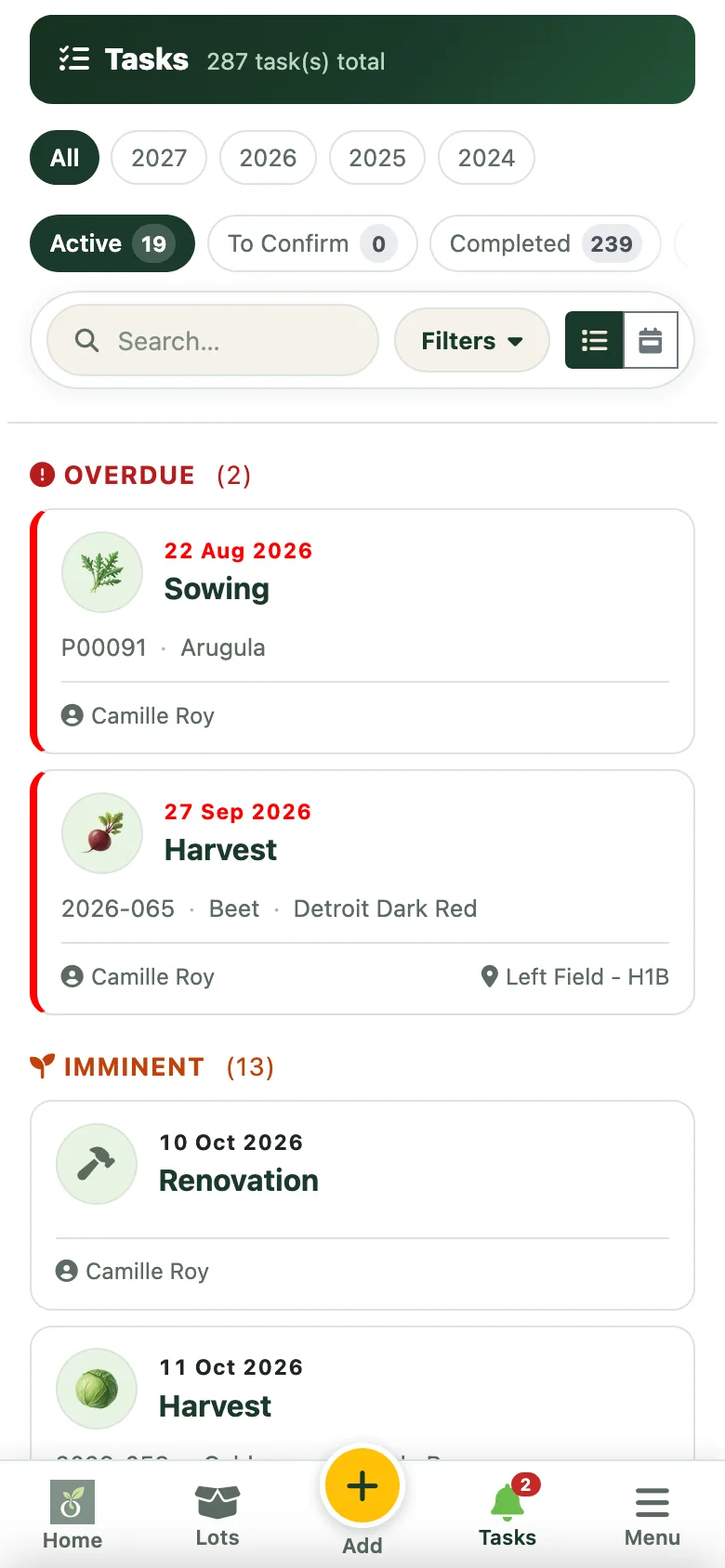
OlaGrow task list: tasks filtered by season and status, grouped by urgency — Overdue, Upcoming — each with its date, type, batch, cultivar, assignee and bed.

What you did, and what came of it.

A note at the end of the day, a photo taken in the field, a weight at harvest. Three ten-second gestures that replace the notebook, the phone's camera roll and the "I'll remember" — and next year, it's all there.

  • Every batch tracked from seed to harvest, stage by stage
  • Photos taken from your phone and attached to the batch — not lost in the camera roll
  • Dated notes on every batch, plus a separate season journal
  • Yields weighed per batch, comparable year over year
OlaGrow media library: the batches that have a photo, each with its number, cultivar, last photo date and stage.

In the field, in the greenhouse, in the office.

OlaGrow runs in the browser of your phone, your tablet and your computer. The same data everywhere, for the whole crew.

OlaGrow on a computer: a batch page, its stages from seeding to harvest.
OlaGrow on a tablet.
OlaGrow on a phone.
App Store coming soon Google Play available

Apps available in Canada only.

We come to your farm, and start from your file.

No software to tame alone on a March evening. We sit down with you, open your spreadsheet, and bring over your crops, beds and dates. You walk away with your season in OlaGrow.

  • A farm visit, within about 200 km of Montréal. Farther away? Let's talk
  • Your crops and beds brought over from your file
  • Your zones, beds and frost dates set up with you
  • A check-in during the season, to adjust what needs adjusting
OlaGrow bed placement: beds P1 to P6 of the garden, each plan placed at its spot with its cultivar, quantity and date.

Ten farms to shape what OlaGrow becomes.

$99

for the first year, full Pro plan — $349

Put my farm forward →
  • Onboarding included — a set-up visit at your farm, your file brought over with you.
  • The full Pro plan — unlimited batches, the whole crew, QR labels, priority support.
  • In return, your feedback — a call or a follow-up visit during the season, to tell us what works and what's missing.
  • Ten spots, first for farms within about 200 km of Montréal.

After the first year, Pro moves to the regular rate, announced before renewal. You stay free to switch to Standard, or to leave with your data. Prices in Canadian dollars, taxes extra.

Simple and transparent

Pro is $99 for the first year for the ten founding farms.

Passionate gardener

Standard

$9.99/month

Or $99/year (2 months free). For the enthusiast gardener who wants to track it all.

  • Unlimited batches
  • Batch tracking & visual planning
  • Automatic tasks
  • Frost alerts
  • Yields weighed by batch
  • Seed & stock management
  • QR label printing
  • Ticket-based support
Try the demo →

Before we talk, see for yourself: a farm in full swing, yours alone for 2 hours. Everything is erased at the end.

Try the demo →

Prices in Canadian dollars, taxes extra.

A love of the land, down to the last square foot.

OlaGrow was born from a passion: that of Claude, an engineer and programmer who grew up in the countryside, close to the land, and now lives in the city.

His proving ground is the backyard of a suburban house. He has made the most of every square foot of it: beds measured to the inch, sowing planned backwards from harvest, successions so nothing sits empty. To keep track from one season to the next, he built the tool he couldn't find anywhere.

He now refines that tool with market growers in the region, met one by one, often in their own fields. What works on a small suburban lot matters even more on a farm, where every metre of bed counts.

Your data is hosted in Québec. It belongs to you, and it is never sold or used for advertising. This site's audience measurement sets no cookies. OlaGrow is developed by OlaGrow Software, a business registered in Québec, Canada.

Is my data mine?

Yes. It is hosted in Québec, we give you a copy on request, and we delete it if you leave. Details are in our privacy policy.

I've been in my spreadsheet for years. Do I lose everything?

No. During the set-up visit, we bring your crops, beds and dates over from your file, with you.

Does it work in the field, on my phone?

Yes, in the browser of any phone or tablet. The Android app is on Google Play; the iPhone and iPad app is coming soon to the App Store.

I can't find the app on my work phone.

If the Play Store icon has a small briefcase, it is your employer's Play Store: it only shows approved apps. Switch to the Personal tab of the app drawer, open the Play Store without the briefcase and search for OlaGrow, or open this link in the personal profile's Chrome. If you only have a Play Store with a briefcase, use OlaGrow in the browser or ask your IT department to approve com.olagrow.app.

What happens after the founding year?

Pro moves to the regular rate, and we tell you before renewal. You can continue, switch to Standard, or leave with your data.

My farm is more than 200 km from Montréal.

The Standard plan is open to everyone. On-site onboarding is limited to the region for now, but write to us — let's talk.